# Elastic Load Balancing

Load Balancing is a networking concept that is used to distribute loads or in simpler terms, let's just say traffic to different servers of the same application. This is particularly useful to improve fault tolerance and performance of applications running in AWS.&#x20;

It integrates with EC2, EKS and Lambda easily.&#x20;

One point to be noted here that there are two types of scaling.&#x20;

* [x] One is vertical scaling, meaning to increase the compute or memory or storage capacity of the instance to meet the demand, but downside is that EC2 needs to be turned off before it can be scaled.&#x20;
* [x] Another type of scaling is Horizontal scaling that can leverage Elastic Load Balancers. Here instead of increasing capacity of existing EC2, another EC2 is spun up (can be done using [auto scaling groups ](https://notes.radifine.com/aws/aws-compute-services/ec2#auto-scaling-groups)of EC2) and then using elastic load balancing, the traffic is routed between existing and new EC2. &#x20;

ELB also supports Availability Zone Balancing; meaning if different servers hosted on EC2/EKS/Lamda  for the same application or use case are distributed across different availability zones, then ELB can be used to serve the user with nearest one, for enhancing the user-experience.&#x20;

### Working of Load Balancer:&#x20;

* Load balancers have a listener that receives traffic and forwards it to internal web or app server depending on the application architecture.&#x20;
* Usually the recipient of the load balancer traffic is configured in form of target group.
* Also important to note that load balancer configuration has something called as target type, which can be either instance or IP. When instance is there, the traffic is forwarded to its Internal IP Address on primary interface. And when IP is selected, private IP has to be specified which can be associated with an interface, other than primary, considering the instances has more than one IP other interfaces.
* The members of the target group are also subjected to a health check to know if traffic can be passed to it or not. This health check is usually done in form of a GET request and successful response ensures that the instance member has passed it or not.

There are four types of Load Balancers:

<figure><img src="https://3681896347-files.gitbook.io/~/files/v0/b/gitbook-x-prod.appspot.com/o/spaces%2FjfQTFfcSjS8MYnjfKw2c%2Fuploads%2FLEbNtZHw3X1WIpepAYvh%2Fimage.png?alt=media&#x26;token=624e3403-7e67-4823-aa72-6ead9506f0d7" alt=""><figcaption></figcaption></figure>

## Application Load Balancers (ALB)

* For passing traffic based on request attributes.&#x20;
* It uses Round Robin algorithm to select the target each time.
* Supports WAF to be used in conjunction with ELB.&#x20;
* Please note that it terminates the client connection by responding to them post looking at HTTP headers and can use any port from 1-65535 for HTTP and HTTPS.&#x20;
* It supports Path and host-based routing (particularly useful for microservices based architecture)

<figure><img src="https://3681896347-files.gitbook.io/~/files/v0/b/gitbook-x-prod.appspot.com/o/spaces%2FjfQTFfcSjS8MYnjfKw2c%2Fuploads%2FVEnaNTFH0Fb15UI8VEAz%2Fimage.png?alt=media&#x26;token=5de74a24-2786-481d-88bc-946997bf2ba3" alt=""><figcaption></figcaption></figure>

<figure><img src="https://3681896347-files.gitbook.io/~/files/v0/b/gitbook-x-prod.appspot.com/o/spaces%2FjfQTFfcSjS8MYnjfKw2c%2Fuploads%2Fjz1KnKk0K2MwzIbUbT9T%2Fimage.png?alt=media&#x26;token=a50ea41c-4632-41de-927a-8eeee60a33ed" alt=""><figcaption></figcaption></figure>

## Network Load Balancers (NLB)

* For passing traffic based on layer 4 protocol and port number.
* Supports any TCP Connection.
* It uses Flow Hash algorithm for even selection of all targets.
* It passes the traffic as it is and does not terminate the HTTP or HTTPS client connections. Hence, the target remains the same tillthe TCP connection is timed out.
* It does not support host or path based routing

<figure><img src="https://3681896347-files.gitbook.io/~/files/v0/b/gitbook-x-prod.appspot.com/o/spaces%2FjfQTFfcSjS8MYnjfKw2c%2Fuploads%2F8jTI2A57JLq3d2AwYhFh%2Fimage.png?alt=media&#x26;token=dbc36197-0c15-4d15-a0fc-b341d9277440" alt=""><figcaption></figcaption></figure>

<figure><img src="https://3681896347-files.gitbook.io/~/files/v0/b/gitbook-x-prod.appspot.com/o/spaces%2FjfQTFfcSjS8MYnjfKw2c%2Fuploads%2FZtXkrJYgERY7RoXHZcQV%2Fimage.png?alt=media&#x26;token=d71a66a2-41c6-43c0-a012-a5025bd0615c" alt=""><figcaption></figcaption></figure>

## GateWay Load Balancers (GWLB)

* For passing the traffic through security appliances.

<figure><img src="https://3681896347-files.gitbook.io/~/files/v0/b/gitbook-x-prod.appspot.com/o/spaces%2FjfQTFfcSjS8MYnjfKw2c%2Fuploads%2FSGvxSC3D5VEQcU0JwIIl%2Fimage.png?alt=media&#x26;token=a6857535-d4a7-48a4-9b69-480d8e7fa127" alt=""><figcaption></figcaption></figure>

<figure><img src="https://3681896347-files.gitbook.io/~/files/v0/b/gitbook-x-prod.appspot.com/o/spaces%2FjfQTFfcSjS8MYnjfKw2c%2Fuploads%2FZhDvKT9HXXDsf4ZA4fPN%2Fimage.png?alt=media&#x26;token=5fcb17f6-2c94-4071-aefb-c85bf8369c8b" alt=""><figcaption></figcaption></figure>

## Classic Load Balancers (CLB)

* For load balancing based on EC2 instances individually.&#x20;
* This is usually used for Network of old EC2 Classic Instances (applicable before 2014) and hence not recommended for VPC deployments

<figure><img src="https://3681896347-files.gitbook.io/~/files/v0/b/gitbook-x-prod.appspot.com/o/spaces%2FjfQTFfcSjS8MYnjfKw2c%2Fuploads%2FKXM1yLuShLyjmjxUqUZX%2Fimage.png?alt=media&#x26;token=30dc30e7-3064-491d-b915-07bc19a8e8df" alt=""><figcaption></figcaption></figure>

<figure><img src="https://3681896347-files.gitbook.io/~/files/v0/b/gitbook-x-prod.appspot.com/o/spaces%2FjfQTFfcSjS8MYnjfKw2c%2Fuploads%2Fyc2xBuTU5BnkMPpaCVm7%2Fimage.png?alt=media&#x26;token=9c5ae5c0-04f1-4295-aeff-d531556f5138" alt=""><figcaption></figcaption></figure>

Note: *Sticky sessions make sure that when a user connection received to ELB gets forwarded to a server, all the subsequent connection remains to that server for a specified period of time to prevent bouncing of connection to other load balanced server*

Note: *Idle Time outs ensures a client connection that is no longer being used, gets closed after a specified number of seconds.*

### Configuring Application Load Balancers.

Consider an application with following architecture:

<figure><img src="https://3681896347-files.gitbook.io/~/files/v0/b/gitbook-x-prod.appspot.com/o/spaces%2FjfQTFfcSjS8MYnjfKw2c%2Fuploads%2FBxLLhhq9ckqyWAom8utS%2Fimage.png?alt=media&#x26;token=23cd9000-7241-470e-89d5-cccfa4719cad" alt=""><figcaption></figcaption></figure>

webs-1, webs-2 and webs-3 are three web servers in three different availability zone and are part of subnets websnet-1, websnet-2 and websnet-3 respectively which is having private IP range of 172.31.1.x/24, 172.31.2.x/24 and 172.31.3.x/24 correspondingly.

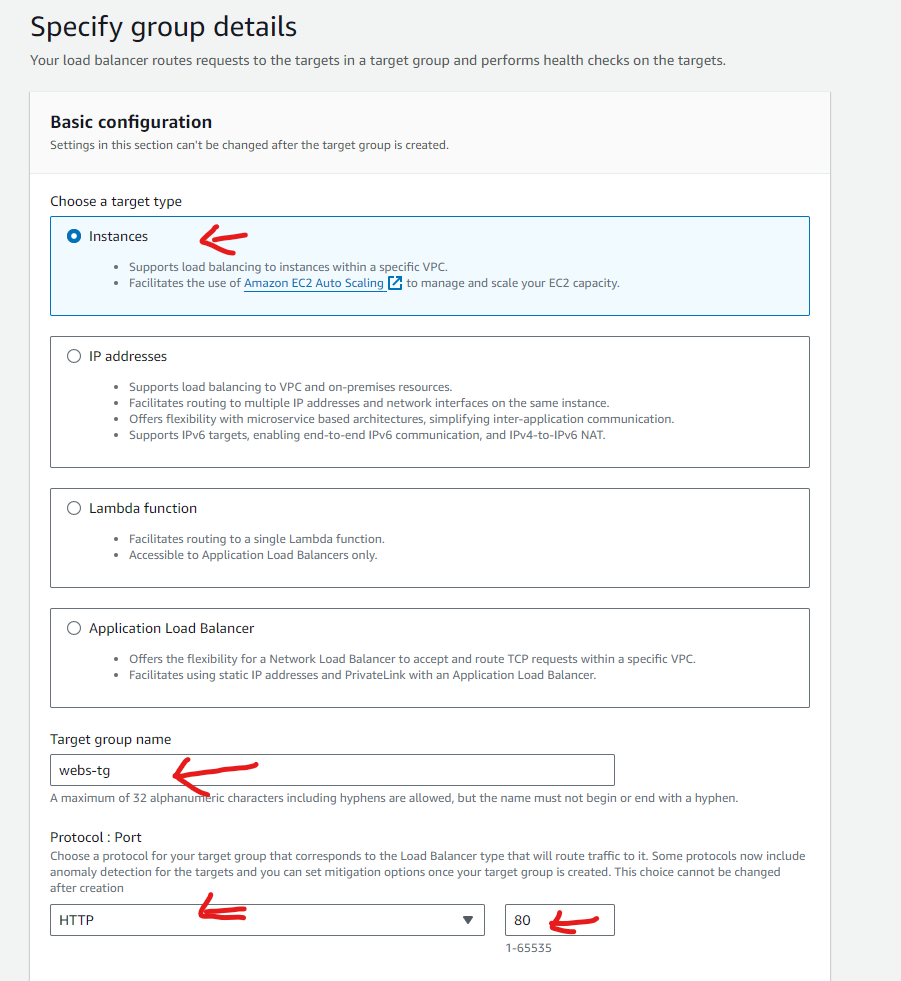
To load balance, the first thing needed is a target group, which can be configured as follows:

<figure><img src="https://3681896347-files.gitbook.io/~/files/v0/b/gitbook-x-prod.appspot.com/o/spaces%2FjfQTFfcSjS8MYnjfKw2c%2Fuploads%2FbdGtRHoLD9fmk7URoqWI%2Fimage.png?alt=media&#x26;token=d1a84580-a266-4e79-b279-c38b2a123feb" alt=""><figcaption></figcaption></figure>

<figure><img src="https://3681896347-files.gitbook.io/~/files/v0/b/gitbook-x-prod.appspot.com/o/spaces%2FjfQTFfcSjS8MYnjfKw2c%2Fuploads%2FdkewuWYgZ9K6XRmX0Zod%2Fimage.png?alt=media&#x26;token=8c8a785c-0ded-436f-b2a4-c40241e37695" alt=""><figcaption></figcaption></figure>

<figure><img src="https://3681896347-files.gitbook.io/~/files/v0/b/gitbook-x-prod.appspot.com/o/spaces%2FjfQTFfcSjS8MYnjfKw2c%2Fuploads%2FBh0xbRPTVh4I9EyPPwta%2Fimage.png?alt=media&#x26;token=f0fa64f4-9127-4ef2-af3d-5efa8af9cd7d" alt=""><figcaption></figcaption></figure>

<figure><img src="https://3681896347-files.gitbook.io/~/files/v0/b/gitbook-x-prod.appspot.com/o/spaces%2FjfQTFfcSjS8MYnjfKw2c%2Fuploads%2FhpjBeZ5om5fQ6HiJwPGZ%2Fimage.png?alt=media&#x26;token=5b5c1196-f676-433d-b537-66327af08904" alt=""><figcaption></figcaption></figure>

<figure><img src="https://3681896347-files.gitbook.io/~/files/v0/b/gitbook-x-prod.appspot.com/o/spaces%2FjfQTFfcSjS8MYnjfKw2c%2Fuploads%2Fqm4AOzp6bIwfsNLDAmGd%2Fimage.png?alt=media&#x26;token=6d55aa39-4e28-48c3-9a6a-dd6f3631198b" alt=""><figcaption></figcaption></figure>

<figure><img src="https://3681896347-files.gitbook.io/~/files/v0/b/gitbook-x-prod.appspot.com/o/spaces%2FjfQTFfcSjS8MYnjfKw2c%2Fuploads%2FNdJNGwDkv4ZrHCaQKyaY%2Fimage.png?alt=media&#x26;token=2b0bdd52-83a8-416e-81f5-e5a4486a542c" alt=""><figcaption></figcaption></figure>

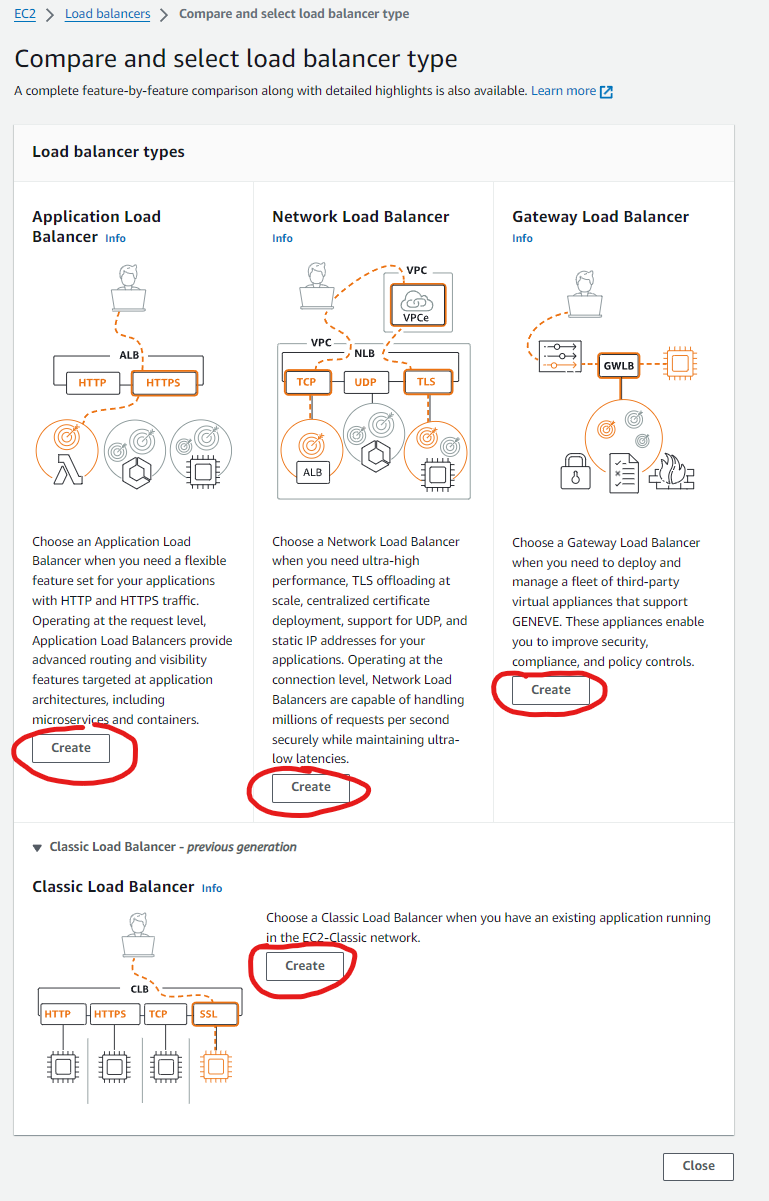
Now, let's see how one can find the creation page for a load balancer on AWS portal:

<figure><img src="https://3681896347-files.gitbook.io/~/files/v0/b/gitbook-x-prod.appspot.com/o/spaces%2FjfQTFfcSjS8MYnjfKw2c%2Fuploads%2Fn1IWPbXMNzXe7aV4FNcD%2Fimage.png?alt=media&#x26;token=f8e39eb4-f62e-4eeb-87d6-88b70e93a07e" alt=""><figcaption></figcaption></figure>

<figure><img src="https://3681896347-files.gitbook.io/~/files/v0/b/gitbook-x-prod.appspot.com/o/spaces%2FjfQTFfcSjS8MYnjfKw2c%2Fuploads%2F6BJaMJitGgUKGmNkIjtC%2Fimage.png?alt=media&#x26;token=e92f12fc-3446-4a27-8a7a-1509de035917" alt=""><figcaption></figcaption></figure>

<figure><img src="https://3681896347-files.gitbook.io/~/files/v0/b/gitbook-x-prod.appspot.com/o/spaces%2FjfQTFfcSjS8MYnjfKw2c%2Fuploads%2F98tHbmzNn1gHAamKW4Ds%2Fimage.png?alt=media&#x26;token=8fb5015b-b849-407c-a32a-21c224653b8d" alt=""><figcaption></figcaption></figure>

*Note, if the load balancer would have been internal, then instead of internet facing, we would have selected internal in the scheme area as shown above.*

<figure><img src="https://3681896347-files.gitbook.io/~/files/v0/b/gitbook-x-prod.appspot.com/o/spaces%2FjfQTFfcSjS8MYnjfKw2c%2Fuploads%2FxadDjMZD7mH0ik4hMuqw%2Fimage.png?alt=media&#x26;token=e4c488b0-054e-420c-94b6-941fd3a8f7f6" alt=""><figcaption></figcaption></figure>

<figure><img src="https://3681896347-files.gitbook.io/~/files/v0/b/gitbook-x-prod.appspot.com/o/spaces%2FjfQTFfcSjS8MYnjfKw2c%2Fuploads%2FxgZeFJtx882ClmqArWoV%2Fimage.png?alt=media&#x26;token=ef69b735-9659-4d2a-88b7-9b9a28a3ef98" alt=""><figcaption></figcaption></figure>

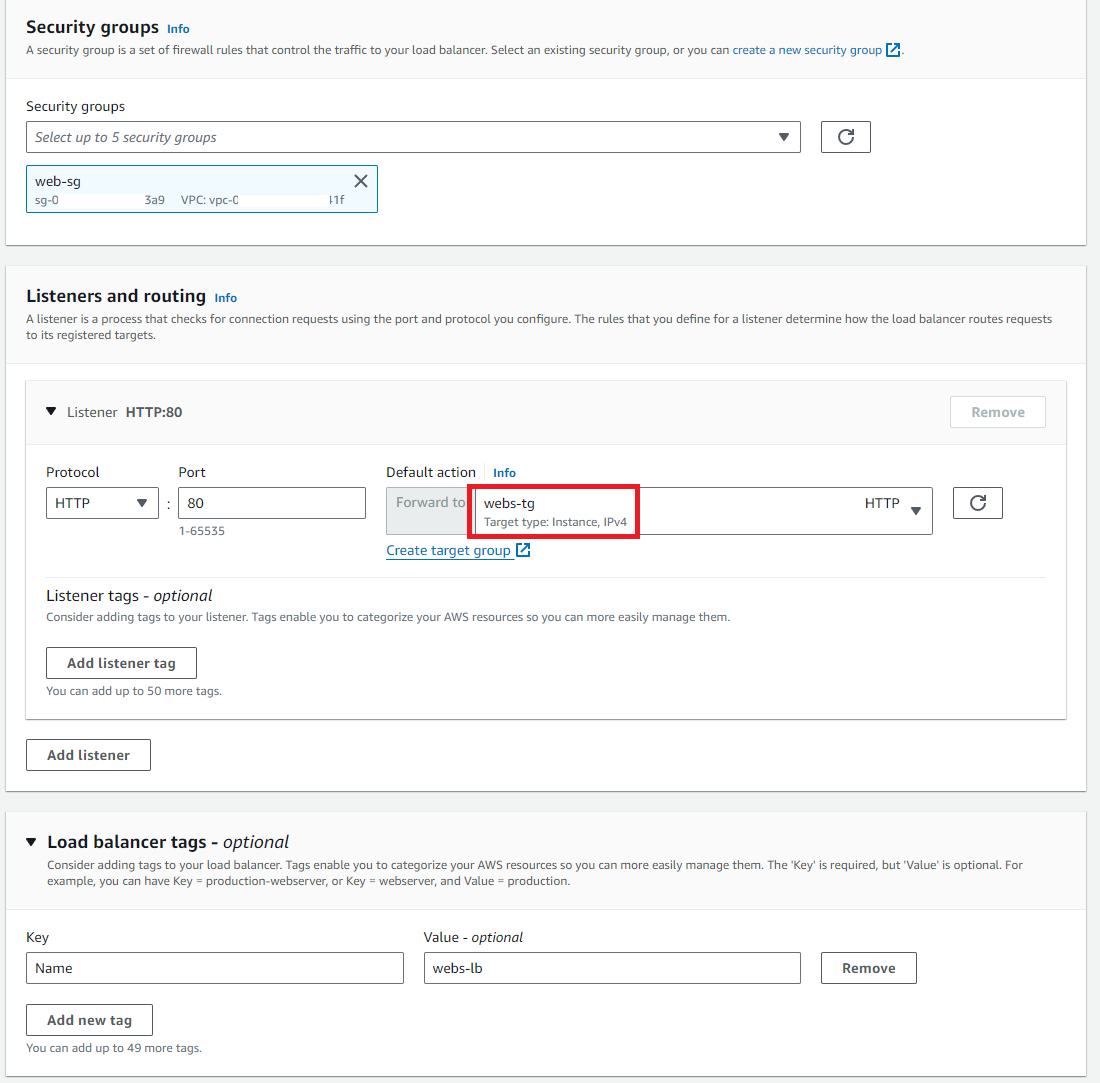
*Note that for HTTPS, one can set the listener to 443 and since it uses TLS, a certificate is necessary to be given to load balancer listener as shown below:*

<figure><img src="https://3681896347-files.gitbook.io/~/files/v0/b/gitbook-x-prod.appspot.com/o/spaces%2FjfQTFfcSjS8MYnjfKw2c%2Fuploads%2Fvch3C3VFAbu93G0uIeI5%2Fimage.png?alt=media&#x26;token=18bcefcb-9e95-4ec3-bd14-2d117119ed18" alt=""><figcaption></figcaption></figure>

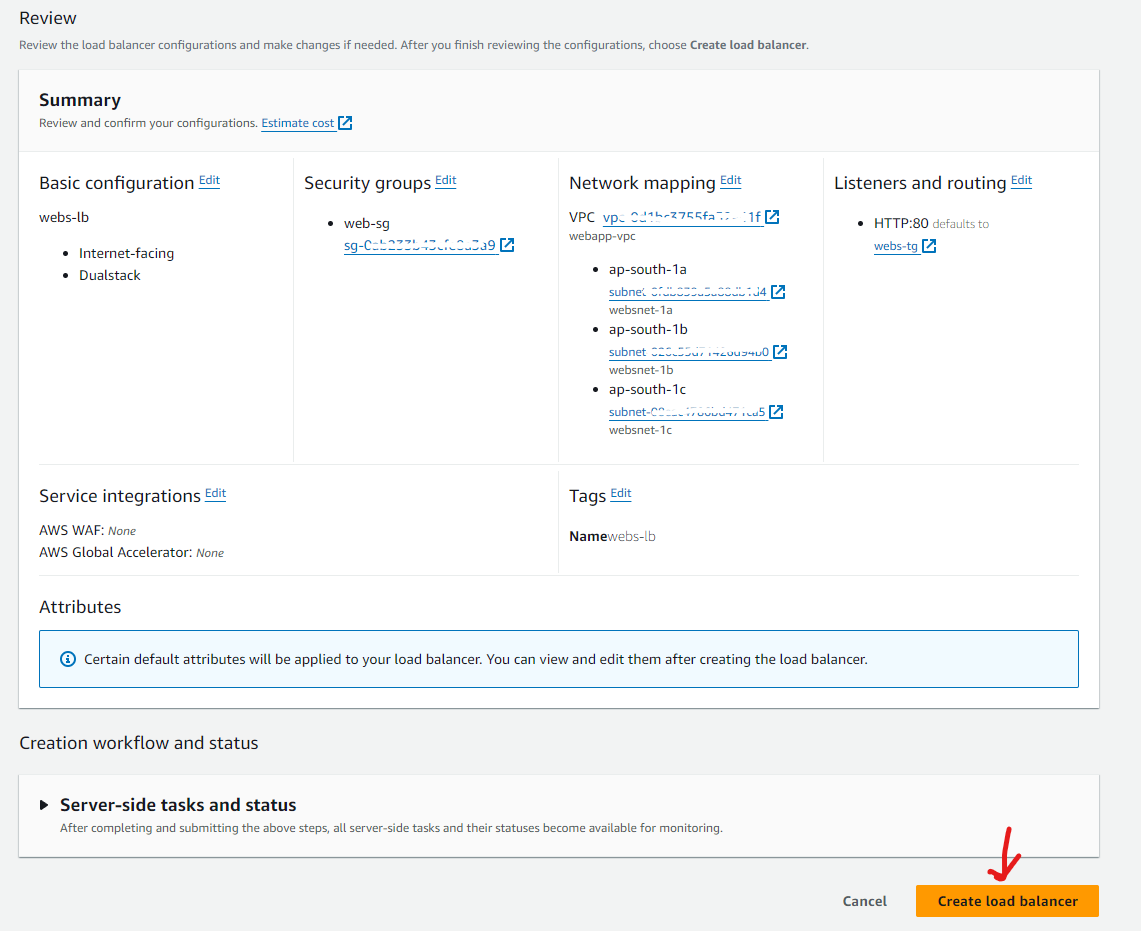
Rest from below, common wizard options are shown:

<figure><img src="https://3681896347-files.gitbook.io/~/files/v0/b/gitbook-x-prod.appspot.com/o/spaces%2FjfQTFfcSjS8MYnjfKw2c%2Fuploads%2Fl59yTZtNTYmSMvuBHabT%2Fimage.png?alt=media&#x26;token=801c1849-5fe1-451b-92fe-dd1aa2a7c993" alt=""><figcaption></figcaption></figure>

<figure><img src="https://3681896347-files.gitbook.io/~/files/v0/b/gitbook-x-prod.appspot.com/o/spaces%2FjfQTFfcSjS8MYnjfKw2c%2Fuploads%2FGY8ZnsMRmK6eCH4gr4Jy%2Fimage.png?alt=media&#x26;token=2e1063e7-ba7f-4bb0-bf62-09bb54e3554b" alt=""><figcaption></figcaption></figure>

<figure><img src="https://3681896347-files.gitbook.io/~/files/v0/b/gitbook-x-prod.appspot.com/o/spaces%2FjfQTFfcSjS8MYnjfKw2c%2Fuploads%2FohVW61arhPHVCJz3jhxH%2Fimage.png?alt=media&#x26;token=33623f95-1fbc-4580-a74b-2c7d16eb44c8" alt=""><figcaption></figcaption></figure>

<figure><img src="https://3681896347-files.gitbook.io/~/files/v0/b/gitbook-x-prod.appspot.com/o/spaces%2FjfQTFfcSjS8MYnjfKw2c%2Fuploads%2FndHI4JJUgZfkPSSmZ4gK%2Fimage.png?alt=media&#x26;token=f56302e1-0873-41b9-9367-563a09291239" alt=""><figcaption></figcaption></figure>

<figure><img src="https://3681896347-files.gitbook.io/~/files/v0/b/gitbook-x-prod.appspot.com/o/spaces%2FjfQTFfcSjS8MYnjfKw2c%2Fuploads%2FLsLO5dkE7v6k1WSD1H51%2Fimage.png?alt=media&#x26;token=3477743f-d860-47ce-a417-0ebbd340a104" alt=""><figcaption></figcaption></figure>

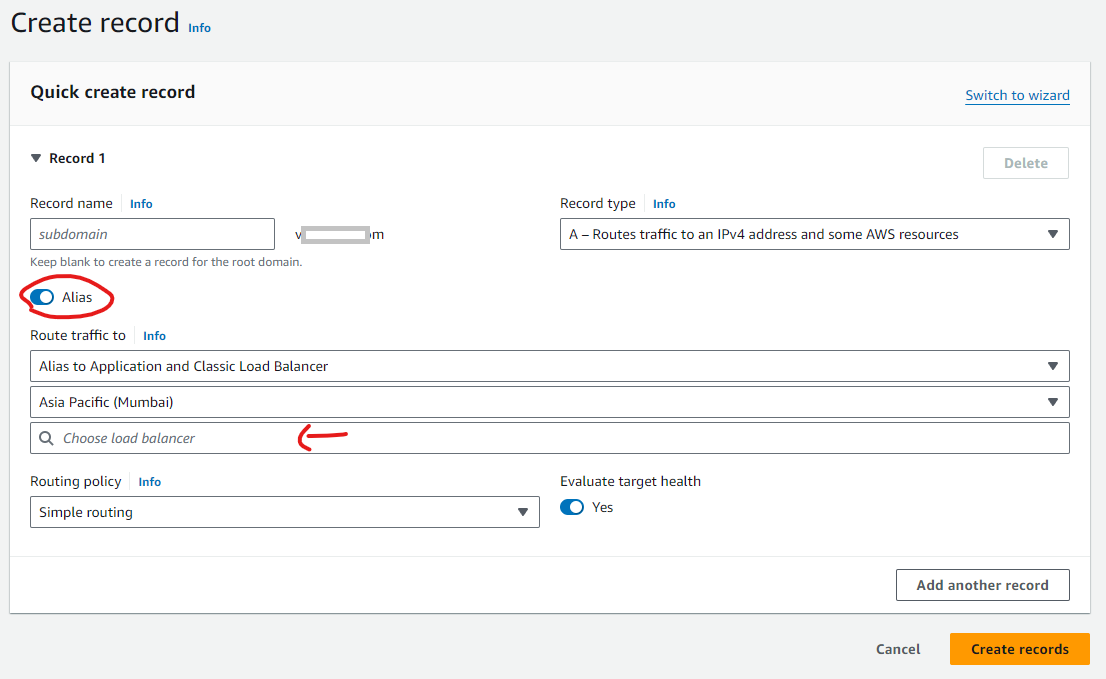
***Note that one can create an alias A record to load balancer for routing traffic via domain name.***&#x20;

<figure><img src="https://3681896347-files.gitbook.io/~/files/v0/b/gitbook-x-prod.appspot.com/o/spaces%2FjfQTFfcSjS8MYnjfKw2c%2Fuploads%2FSTlangClcnCbwU2BSTsr%2Fimage.png?alt=media&#x26;token=1bfa1cea-bf82-414a-b5d5-c0e39bce99dd" alt=""><figcaption></figcaption></figure>

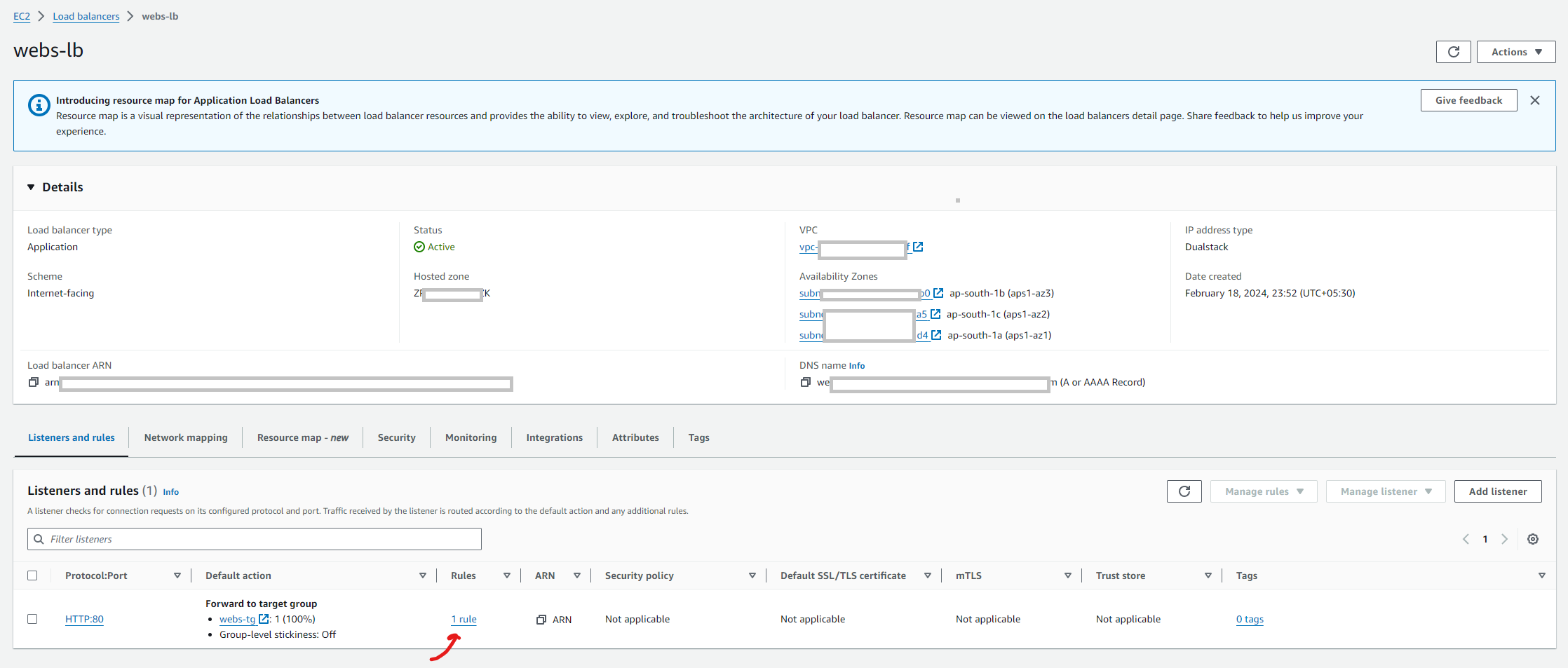
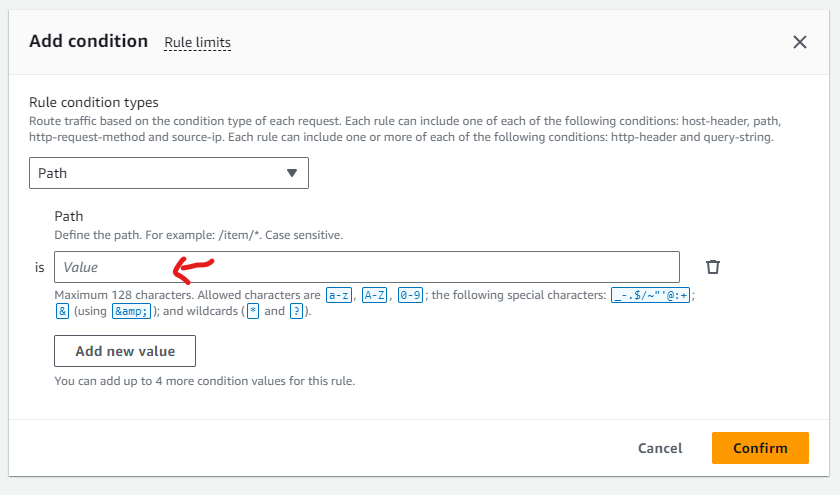
Now, if one wishes to do rule based routing, one can setup the rules accordingly. Example: There is one domain configured to a load balancer. The requirement is that when the path after the domain name is different in the URL, a different target group (of maybe the same target servers but the service is listening on different port number) should be reached out, so that the resource can be loaded accordingly. To do this, one can set the rules accordingly.

<figure><img src="https://3681896347-files.gitbook.io/~/files/v0/b/gitbook-x-prod.appspot.com/o/spaces%2FjfQTFfcSjS8MYnjfKw2c%2Fuploads%2FDqPokYoY1SEUb1RJB7Nc%2Fimage.png?alt=media&#x26;token=ce1308c5-aee3-4831-8b0b-638ed256e959" alt=""><figcaption></figcaption></figure>

<figure><img src="https://3681896347-files.gitbook.io/~/files/v0/b/gitbook-x-prod.appspot.com/o/spaces%2FjfQTFfcSjS8MYnjfKw2c%2Fuploads%2F1lOzCZSSnRw1nlXwDxha%2Fimage.png?alt=media&#x26;token=659b09a9-5966-40c9-9000-cc129480a8f8" alt=""><figcaption></figcaption></figure>

<figure><img src="https://3681896347-files.gitbook.io/~/files/v0/b/gitbook-x-prod.appspot.com/o/spaces%2FjfQTFfcSjS8MYnjfKw2c%2Fuploads%2FxUH1pygsuVgDQEaiVhh9%2Fimage.png?alt=media&#x26;token=bab4153c-8b9d-4b1f-9d32-ac8bd4c2a35b" alt=""><figcaption></figcaption></figure>

<figure><img src="https://3681896347-files.gitbook.io/~/files/v0/b/gitbook-x-prod.appspot.com/o/spaces%2FjfQTFfcSjS8MYnjfKw2c%2Fuploads%2FBk7pTa8l6iDuYAlp1dbj%2Fimage.png?alt=media&#x26;token=5642ccc1-6231-43f3-ba6e-453d85f0a576" alt=""><figcaption></figcaption></figure>

<figure><img src="https://3681896347-files.gitbook.io/~/files/v0/b/gitbook-x-prod.appspot.com/o/spaces%2FjfQTFfcSjS8MYnjfKw2c%2Fuploads%2FuTfQd536dfb2dhHfpcG3%2Fimage.png?alt=media&#x26;token=42e7d955-6557-4d01-87ca-60a9e38bd83a" alt=""><figcaption></figcaption></figure>

Other rules can be on the basis of:

<figure><img src="https://3681896347-files.gitbook.io/~/files/v0/b/gitbook-x-prod.appspot.com/o/spaces%2FjfQTFfcSjS8MYnjfKw2c%2Fuploads%2FiAjRTXaYZqpXwqKcL2OP%2Fimage.png?alt=media&#x26;token=ec5fb10f-0820-4d0c-bc6f-dca22a4b9311" alt=""><figcaption></figcaption></figure>

### Configuring Network Load Balancers

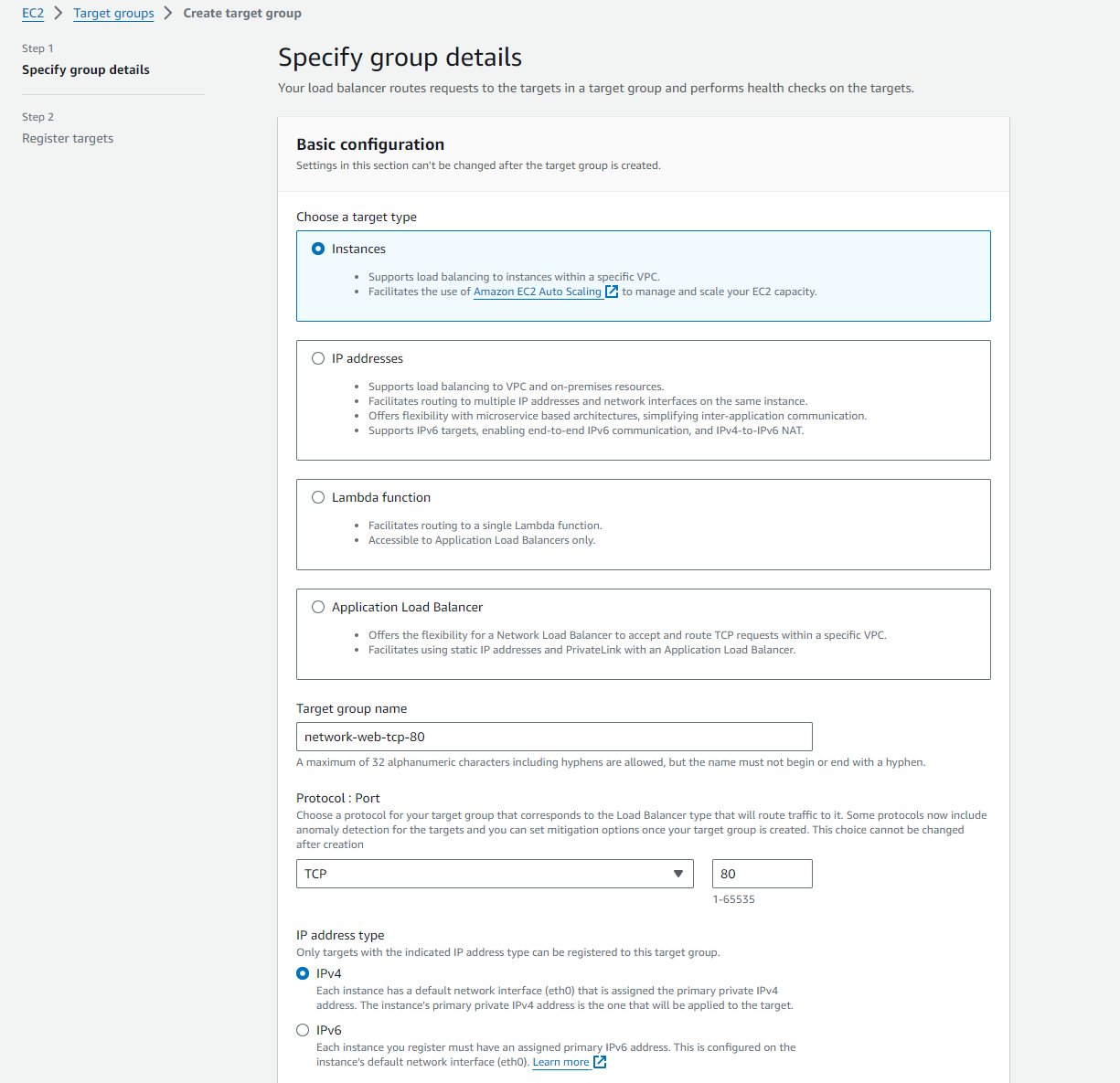
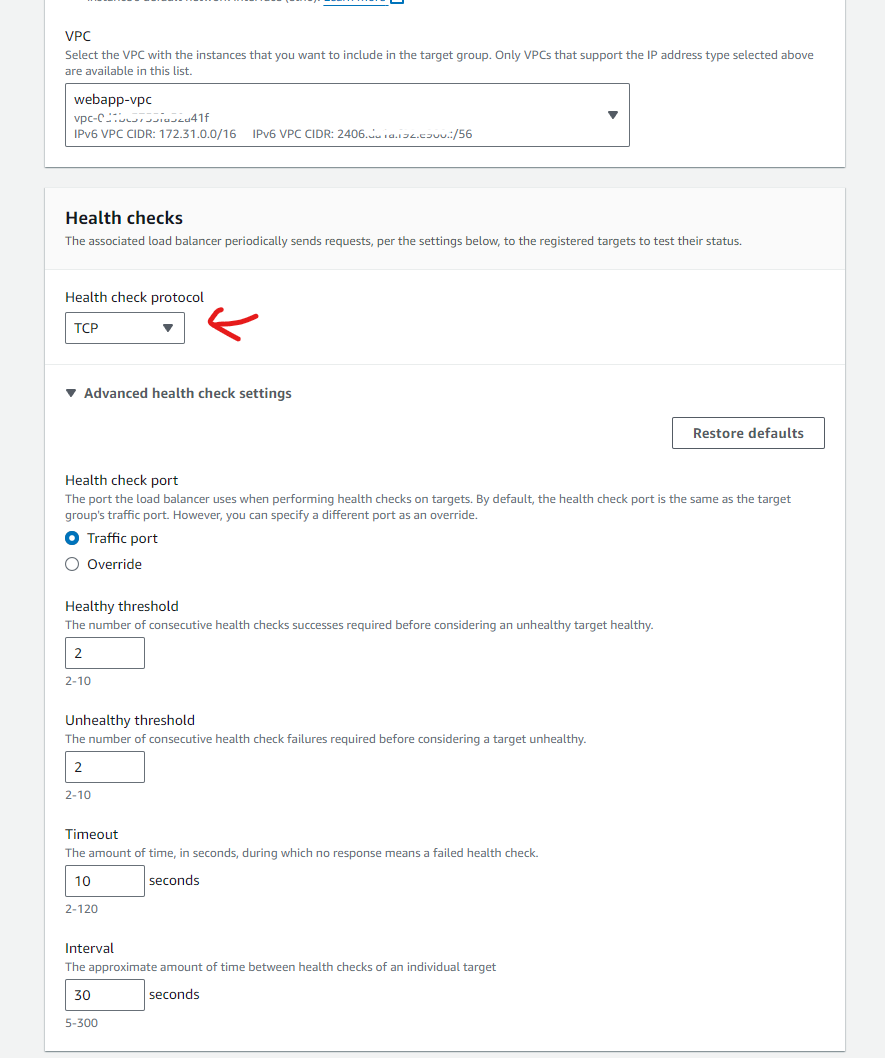
The process is almost the same as Application Load Balancers. The only difference is that instead of HTTP/HTTPS, TCP has to be selected.

&#x20;

<figure><img src="https://3681896347-files.gitbook.io/~/files/v0/b/gitbook-x-prod.appspot.com/o/spaces%2FjfQTFfcSjS8MYnjfKw2c%2Fuploads%2F5qim7iuhOhSOv7Mtnw29%2Fimage.png?alt=media&#x26;token=51f17e2f-bde3-49ff-9b69-4f104a7ee6db" alt=""><figcaption></figcaption></figure>

<figure><img src="https://3681896347-files.gitbook.io/~/files/v0/b/gitbook-x-prod.appspot.com/o/spaces%2FjfQTFfcSjS8MYnjfKw2c%2Fuploads%2FbYU4wr92cV8Hqd1N5kED%2Fimage.png?alt=media&#x26;token=b27017b8-2247-44a3-b6c8-463acc3fda72" alt=""><figcaption></figcaption></figure>

<figure><img src="https://3681896347-files.gitbook.io/~/files/v0/b/gitbook-x-prod.appspot.com/o/spaces%2FjfQTFfcSjS8MYnjfKw2c%2Fuploads%2FcS1jVMwdNkcZjd1C9FuH%2Fimage.png?alt=media&#x26;token=44d56d38-1980-4e7a-9013-ed993d70bab2" alt=""><figcaption></figcaption></figure>

<figure><img src="https://3681896347-files.gitbook.io/~/files/v0/b/gitbook-x-prod.appspot.com/o/spaces%2FjfQTFfcSjS8MYnjfKw2c%2Fuploads%2FOERNRG1z4OK6AJMolckO%2Fimage.png?alt=media&#x26;token=7fd07bd1-6a47-4591-9279-d8a7a1a67898" alt=""><figcaption></figcaption></figure>

<figure><img src="https://3681896347-files.gitbook.io/~/files/v0/b/gitbook-x-prod.appspot.com/o/spaces%2FjfQTFfcSjS8MYnjfKw2c%2Fuploads%2FZATs0nIMmKXhQPpYpgmN%2Fimage.png?alt=media&#x26;token=64e7a5fa-fe98-42aa-aa37-99955c52f093" alt=""><figcaption></figcaption></figure>

and rest of the process is exactly the same.

*Please note for having HTTPS connection over Network Load Balancer, each target must have the certificate installed individually because one can't install the certificate on load balancer itself as the connection is pass through and terminates directly on the target itself.*

## Session Management

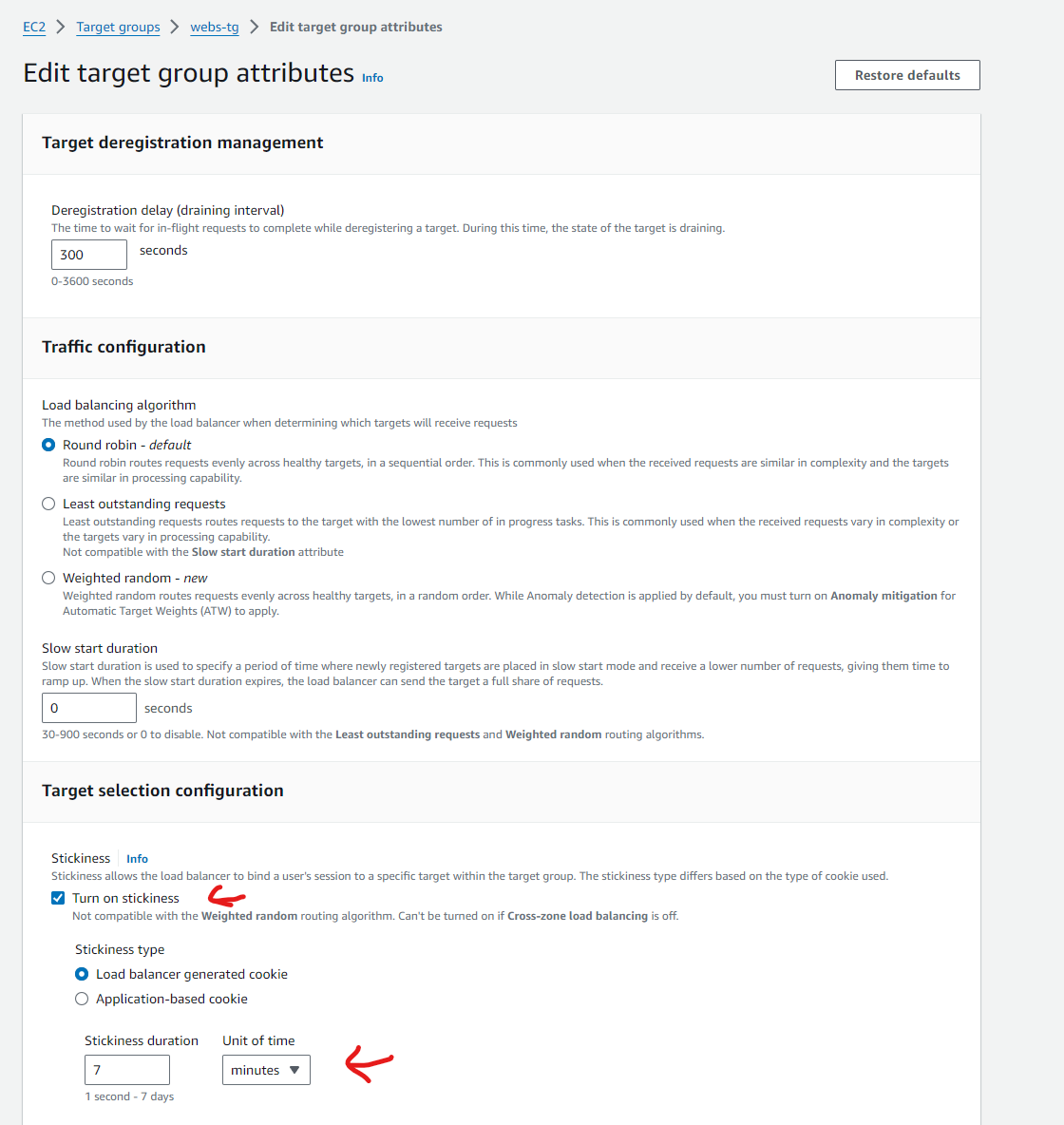
Sticky sessions ensures that a particular client connection always gets forwarded to the same target that it originally gets load balanced to. To do this, the load balancer uses cookie which has a unique encrypted value that changes with each request. When different clients and load balancer are communicating with each other, load balancer identifies a particular client with the help of that changing value cookie and on basis of that, the load balancer forwards every subsequent request to a particular target of the target group. Stickiness duration can range from 1 second to 7 days. It can be configured as shown below:

<figure><img src="https://3681896347-files.gitbook.io/~/files/v0/b/gitbook-x-prod.appspot.com/o/spaces%2FjfQTFfcSjS8MYnjfKw2c%2Fuploads%2FNF1RBnsUITMXu12OQ39N%2Fimage.png?alt=media&#x26;token=52471a0d-5e81-4f75-94ca-3edc8001c68a" alt=""><figcaption></figcaption></figure>

Idle Timeouts maintains the duration till how long a TCP connection for a client is open as it is this TCP connection in which HTTP request and response traverses. idle simply means no data is passing between client and server and default timeout is 60 seconds. If simply due to business or non performance of the a particular target of the target group result into timeout, then client receives a gateway timeout error with 504 code.&#x20;

<figure><img src="https://3681896347-files.gitbook.io/~/files/v0/b/gitbook-x-prod.appspot.com/o/spaces%2FjfQTFfcSjS8MYnjfKw2c%2Fuploads%2FSd6fCOxDwu3CnZdAr2j4%2Fimage.png?alt=media&#x26;token=e05d7d5d-4e51-42f6-8ed8-0811945dbbf0" alt=""><figcaption></figcaption></figure>

<figure><img src="https://3681896347-files.gitbook.io/~/files/v0/b/gitbook-x-prod.appspot.com/o/spaces%2FjfQTFfcSjS8MYnjfKw2c%2Fuploads%2F3htZvPNOJvpmrFMlaE6x%2Fimage.png?alt=media&#x26;token=ebd23820-2ca5-4050-9cce-2c2b226f8766" alt=""><figcaption></figcaption></figure>

Just like idle timeouts are for connection waiting time for clients , keep alive time is for waiting time of load balancer to receive response from the a particular target of the target group before terminating the connection.
<figure><img src="https://3681896347-files.gitbook.io/~/files/v0/b/gitbook-x-prod.appspot.com/o/spaces%2FjfQTFfcSjS8MYnjfKw2c%2Fuploads%2Fz8KBt4p7WyXZOKsypBBZ%2Fimage.png?alt=media&#x26;token=506e325a-77e5-4b67-9a13-85f822f1ffe4" alt=""><figcaption></figcaption></figure>